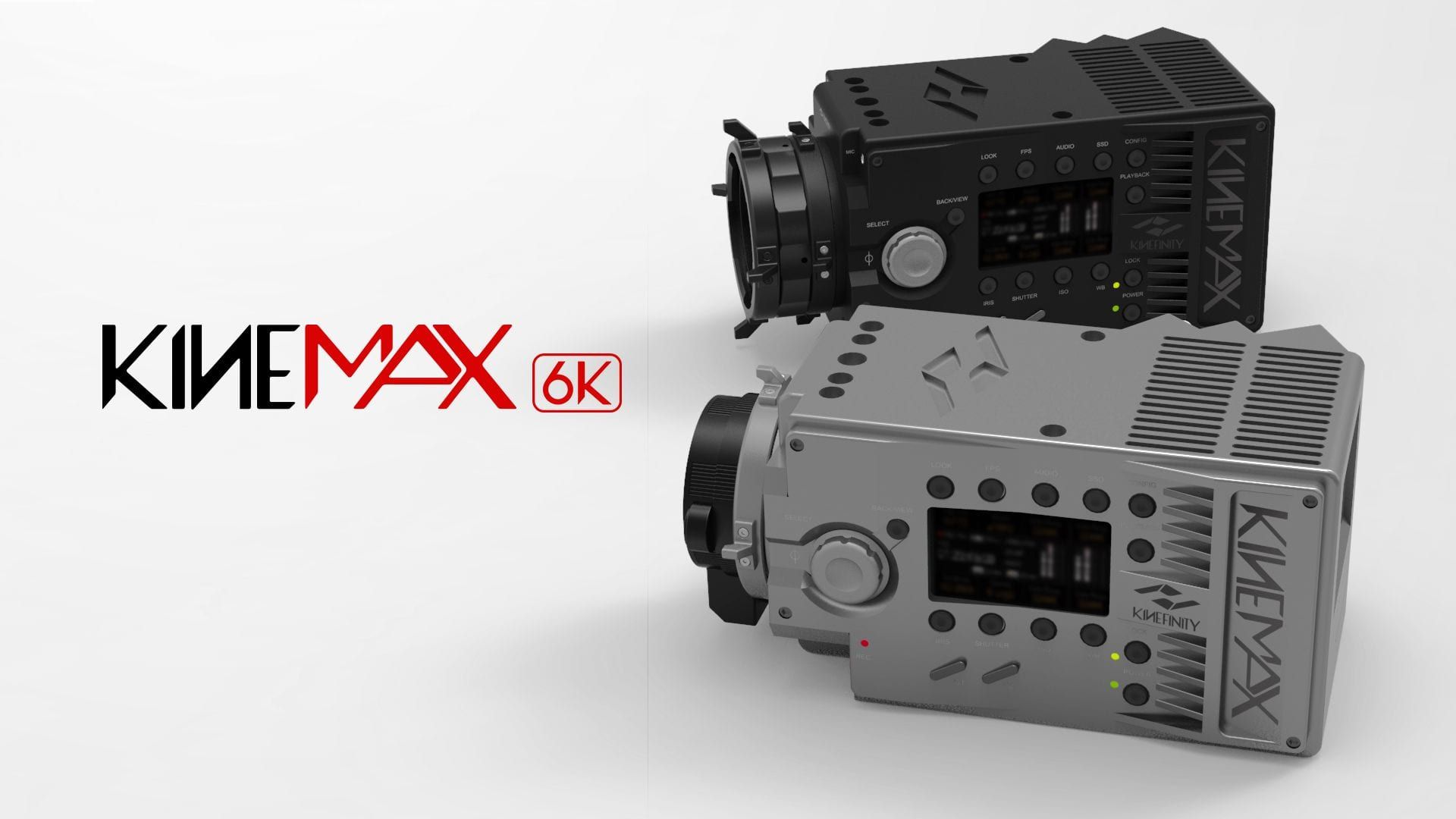
KineMAX 6K
MAX Details · MAX Latitude · MAX Flexibility
6K details and framing space is beyond imagination, > 18 Million pixels in one frame: 9 times of Full HD/1080p, 2.25 times of UHD/3840×2160! Every single frame matches high-end DSLR RAW photo!
KineMAX is not only targeted 4K delivery, but also covers from 1080p to 6K, all resolution capturing weapon from HD to UHD, iMAX. It captures images with maximum resolution, but also maximum latitude up to 16 f-stops. With very compact and lightweight, KineMAX provides maximum flexibility for shooting, with quick interchangeable mounting system for all lens you can imagine.
Features
6K RAW In-Camera
KineMAX is capable of Capturing and Recording 6K RAW without external recorder. KineMAX is honoured as one of three cinema camera models in this planet. 6K RAW is recorded as KineRAW(.krw) codec which is compressed lossless RAW format developed by Kinefinity. For 4K and lower resolution, it can record Uncompressed CinemaDNG; for 3K and lower resolution, it can record Cineform RAW which is easy to be edited and graded in mainstream DI software. 6K RAW capturing and recording leaves very large room for reframing, trimming, and CG, especially for 4K delivery. At same time, it also features capturing and recording 6K, 4K, 3K, 2K, 1080p in both S35 frame and crop mode: that means KineMAX can cover from 1080p to 6K, every mainstream resolution in one camera.
16 f-stops
KineMAX employs state-of-art CMOS sensor: 14 f-stops with 12bits output at 6K resolution; amazing 16 f-stops at binning 3K (S35 framing) & binning 2K resolution (M4/3 framing). KineMAX brings you not only maximum details, but also maximum latitude in every frame, at every case. At same time, KineMAX itself supports all kinds of crop modes with the same latitude of 6K: M4/3 framing 4K, S16 framing 3K.
KineRAW codec
KineRAW (.krw) codec, cinema-level codec is developed by Kinefinity with great efforts and resources. Average compression level is 2:1~3:1, lossless compression algorithm: it remains whole information of original image, there is no color sampling and loss. The 240GB KineMAG SSD could record around 45 minutes 4K RAW clips with its date rate close to ProRes422HQ. It can be transcoded into Cineform mov for Cineform workflow and CinemaDNG for CinemaDNG workflow by KineStation; It really fits 4K, 5K, 6K recording and HiSpeed recording, saves much more storage room, for easier data backup.
100fps SLOW-MO
KineMAX has the power of capturing Slow-Mo up to 4K Wide 100fps. At HiSpeed S35, KineMAX supports 4K Wide Slow-Mo up to 100fps, while KineMAX supports 3K Wide to 150fps at HiSpeed M4/3 and 2K Wide to 225fps at HiSpeed S16. At same time, M4/3 (Crop mode) 4K Wide up to 56fps, S16 (Crop Mode) 3K Wide to 75, 2K Wide up to 110fps. As of undercrank/quick-mo, the lowest fps is down to 6fps under current firmware. You can set any custom sensor fps between lowest and highest fps, the accuracy is 0.001fps.
4K 4:3 Anamorphic
Native 4K 4:3 frame as 4320×3240@25fps: Aspect ratio of 4:3 matches anamorphic lens with factor of 2, so that it will gain CinemaScope frame as 8:3(2.66:1). With the process in post-workflow, it can reach up to 8640×3240 (8K) CinemaScope! It also support standard DCI 4K 4096×3076@25fps 4:3 resolution.
Super 35mm
KineMAX is a Super35mm sized CMOS sensor camera with outstanding low light performance for UHD use as well as for making DCP for projection in modern digital movie theatres where signal to noise ratio under difficult lighting conditions is very important. In the case of shooting feature motion pictures and commercials with ample lighting, the camera can be used as a normal movie camera would be for the cinematographer take advantage of the camera's wide exposure latitude and ISO range from to get textures from silky fine gain to gritty as needed.
KineStation
New KineMAX, Free KineStation. KineStation + KineCamera = Kine Hybrid System (KHS). Kine Hybrid System (KHS) is designed to make frontend capturing and backend processing for high-efficiency post workflow. Kine Cameras as frontend capturing tool as RAW to remain Maximum details and latitude, and KineStation as backend bridge running on PC or MAC to post workflow. KineStation can transcoding KineRAW and CinemaDNG into Cineform RAW and Cineform RGB444 with debayer options for different controls from RAW into RGB domain to match your favourite workflow. The KineStation will integrate more codecs like ProRes codecs, DPX, H264, H265 and LUT options for quick output.
Built-in Cineform RAW
The KineMAX can record the 2K/3K Cineform™ RAW at real time, online. And KineStation can transcode 6K/4K KineRAW/CinemaDNG into 6K/4K Cineform RAW offline. Cineform RAW is as compressed raw using very high quality wavelet compression: visually lossless, and making work-flow more efficient. The famous films like Oscar winner Slumdog Millionaire were acquired by CineForm RAW compression for most images, and also the 127 hours. Cineform codec is cross-platform: run on both MAC and Windows smoothly and efficiently. Nearly all commercial editing tools and grading tools like Final Cut Pro, Premiere, Speedgrade, Resolve, Scratch etc. support Cineform very well.
NEW LOCK-TYPE EF/F MOUNT
KineMINI camera employs whole new lock-type/Cine-style EF/Nikon F mount from 2014 Jan. Its fixing way is very similar to Cine PL mount: lock ring rotation, not lens rotation to make sure EF/Nikon F lens locked firmly and to be contacted well with pogo-pin contact inside of EF mount in any case. Compared to traditional lock way based on spring metal, the new EF/Nikon F mount gains much better stability; fits very well in professional way when video shots using follow-focus gear.
KineMOUNT Interchangeable Mount
KineMAX uses Short FFD KineMount (Sub PL mount) with mount adapters to support various lens mounts, including standard PL mount, Canon EF mount (Active, Iris-controlled) and Nikon F mount, even OCT-19, B4 mount. If you have a 35mm move camera now you can ask us about having custom adapters made in addition to our stock adapters, and protect your investment in great glass. For those on a budget, other lenses made for DSLR can give good HD or DCP results when used near their prime stop.
CinemaDNG
CinemaDNG™ is frame-based, just like Film. CinemaDNG™ offers maximum image quality and license free archive of your shots as "Digital Negative" that can be processed any way you like and be archived in an "open file format" that can be accessed and supported for all time to come, no matter what happens. CinemaDNG™ is Adobe™'s format for saving motion picture digital negatives the digital equivalent of motion picture color negative film.
Sport Mode
KineMAX features sport mode which reduces rolling effect greatly, seems like global shutter. KineMAX employs state-of-art CMOS sensor, which is rolling shutter type, then suffers some rolling effect. Sport Mode is designed to alleviate the rolling greatly, and make KineMAX handle quick movement shootings, like handheld, shots on shoulder, documentary style. The footages would be turned into Cineform RGB444 mov after KineStation transcoding. Sport Mode works on 4K/3K/2K/1080p.
3G SDI and HD Digital Display
KineMAX outputs monitoring signal as 1080p/720p through two SDI ports and one HD digital port, so that you can use compatible third-party EVF like Cineroid EVF/Alphatron EVF, small field monitor like SmallHD monitors and broadcast monitor with SDI input like Zunzheng Monitor. For focusing, the camera's zoom function can be Full/100%/200%, and even 800% to make focusing job easier. The in-camera waveform monitor and zebra can monitor the RAW signal or "look" LUT so that it helps you better exposure and avoid over-exposure.
M4/3 and S16
KineMAX can provide Multiple framing options for different lens, because 6K S35 sensor provide sufficient resolution and framing choices. S35 framing uses standard PL mounting lens, and DSLR full-frame lens, APS-C lens to recording 6K and binning 3K. M4/3 framing uses M4/3 lens and even B4 lens for 4K or lower resolution. In this S16 mode, you can use S16 PL cine lens, even the broadcast B4 mount lens, to shoot in 3K RAW image, with less rolling effect, and overcrank to 75fps@3K wide. One for All!
LIGHT-WEIGHT AND COMPACT
Only 2cm longer than KineMINI, while adding 3K Cineform RAW and 6K KineRAW recording, integrated battery plate and compatible with KineKIT for KineMINI. And there are two color options for camera body: Black and Titanium Grey.
Sensor Framing Options
KineMAX's native frame is 6K S35 so that there are many recording options on framing and resolutions: S35 6K RAW recording, S35 binning 3K RAW recording, S35 HiSpeed 4K/2K recording. Since KineMAX supports cropping mode, the frame can be cropped into 4K M4/3, 4K 4:3, 3K S16 in one second, and you get additional options on framing: 4K Wide @56fps M4/3 image output (crop mode), 3K Wide @75fps S16. For 6K/3K S35 frame, DSLR lens and PL cine lens are used; for 4K M4/3 frame, M4/3 lens, and B4 mount lens are reborn to work for you. KineMOUNT to B4 and PL mounting adapters built in steel handle heavy PL lens and B4 mounting lens easily. At same time, it powers the zoom servo motor.
KineStation and Record Codec
KineMAX features three great RAW options: 6K KineRAW, 4K CinemaDNG and 3K Cineform RAW, choose Cineform or CinemaDNG based on your post-workflow. KineStation can transcoding KineRAW and/or CinemaDNG into Cineform RAW, RGB444 to match your post workflow.
Accurate Automatic WB
KineMAX provides accurate Automatic WB, so that you can deal with complicated lighting environment easily. Just use grey card or white card before lens, to set the WB accurately instantly. KineMAX would save the parameter into camera for later usage. Besides, KineMAX has two options for white-balance list: simple list and complete list. The complete list contains a long list for different lighting and different WB value (step is 50K). For most cases, an appropriate WB setting you could find to match your condition.
Sport Mode
Also Named as HiSpeed Mode. KineMAX features sport mode which reduces rolling effect greatly, seems like global shutter. Sport Mode is designed to make KineMAX handle quick movement shootings, like handheld, shots on shoulder, documentary style. Sport Mode supports 4K, 3K and 2K recording.
Slow and Quick Motion
KineMAX is capable of slow and quick motion capture (overcrank and undercrank). At HiSpeed mode, KineMAX supports 4K Slow-Mo at S35 framing size, No cropping, and No limitation on recording time. At same time, M4/3 (Crop mode) 4K Wide up to 46fps, S16 (Crop Mode) 3K Wide to 75, 2K Wide up to 110fps. As of undercrank/quick-mo, the lowest fps is down to 6fps under current firmware. You can set any custom sensor fps between lowest and highest fps, the accuracy is 0.001fps, while recording fps is set by project fps in the camera.
EI and ISO
EI/ISO is a setting on capture ability of Image Sensor. KineMAX™ can config in two ways: EI to match film camera setting; ISO to match general camera setting and highlight level can be tuned at the same time.
Integrated Battery Plate
KineMAX provides integrated battery plate, you can choose SONY V-mount or Anton Bauer Mount. It reduces the connections between camera body and battery, and reduces possibility of power failure. Large Broadcasting Battery located at the back end will help balance when shoulder pack. Besides, camera body output two extra 12V, 1A DC outputs to filed monitor or EVF.
Smart Playback
KineMAX can playback/delete clips recorded in SSD quickly in smart way. You can check the waveform, histogram and Zoom focusing when playback, like you do in live view.
Advanced Waveform
KineMAX has waveform in-camera: you don't need to buy monitor with waveform. Using waveform, cameraman can judge exposure quickly and accurately. The difference between KineMAX and other camera is that KineMAX has two ways to examine the exposure: just RAW data or RAW+LUT data. RAW data is what sensor sees directly; and RAW+LUT data is more like human eyes, in waveform and histogram.
Real 3D Shots
KineMAX can take real 3D shots. Just one SYNC cable to connect two KineMAX SYNC port, set up Master and Slave instantly. 3D SYNC means: Scan sync, frame sync and time code sync, less than 5uS of mismatch!
Histogram with Tick Mark
KineMAX integrate not only histogram, but also special tick mark. The tick mark has two ticks: one is grey, the other is white. That means 18% grey and 90% white respectively. The exposure level would lie on the grey or white tick if you use 18% grey card or 90% white card before camera, and set ISO, Iris and shutter time accurately, based on lightmeter. Like waveform, histogram also shows RAW or RAW+LUT data automatically.
ZOOM and Focusing
KineMAX provides Zoom to help focusing: full, 100%, 200%, 800%. Just press the Zoom button to toggle zoom ratio quickly. Zoom to 800% provides an interesting focusing signal: aliasing clear means focusing right.
Smart FAN Control
KineMAX has in-camera fan to cool the camera itself and make camera work well in stable condition. Fan generates noise. You can choose Record Stop in Fan setting to make FAN stop works temporarily: Fan works when live view; Stops when recording begins so that it is totally quiet when recording. It is very important in quiet environment, and sensitive to any audible noise. Strongly Recommend fan running when recording Cineform RAW.
Framing Ratio: 2.39:1
KineMAX supports 2.39:1 liveview and recording natively, besides 16:9 or 2:1 framing ratio. 2.39:1 is DCI scope standard, which is often used in short film and cinema projection.
Anamorphic Lens
If you have anamorphic lens and want to give super wide effect, KineMAX camera can fullfil the dream. KineMAX supports 4K 4:3 anamorphic frame size, and de-squeeze images into normal images in live view and playback, just setting the display ratio according to your anamorphic ratio. For example, you will get 8K image effect if you use 2:1 anamorphic lens in 4K 4:3 mode; All you have to do is set the anamorphic ratio in configure menu.
Upgrade Firmware in One Minute
KineMAX functions more than just a data table, by updating firmware. Updating firmware is easy and quick: less one minute, the update job is done.
Iris-Control on EF Lens
KineMAX supports majority of lens with iris-control as soon as you buy camera with native EF mount or active EF mounting adapter for KineMOUNT mount. KineMAX displays Iris number and tune it directly. Also you can just disable electronic active EF mounting adapter so that protects it from all-metal lens backend.